Review fundraisers for school approval
Districts can let School Admins be the only approval needed. Or, they can be part of a larger process, where the School Admin must approve before the fundraiser is sent to the district for approval. School Admins are notified when there are approvals pending.
1. On the Pending Actions notification, click Click Here.
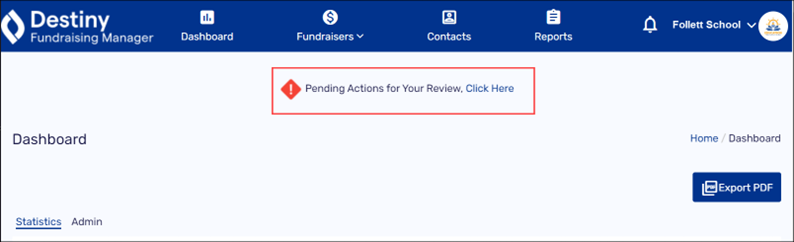
The Approve Fundraising page appears.
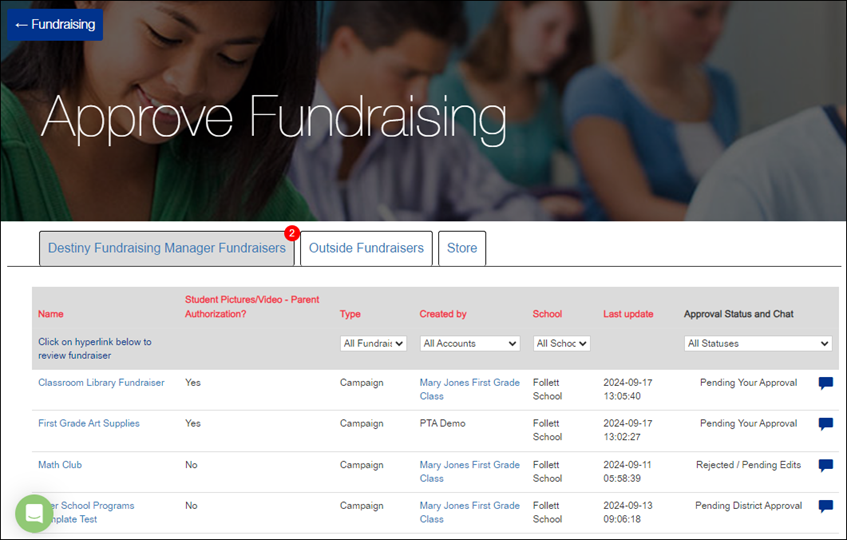
Note: A red circle with a number shows which type and how many fundraisers need to be approved.
2. Click the tab for the type of fundraiser you want to review:
-
Destiny Fundraising Manager Fundraisers
-
Outside Fundraisers
-
Store
3. In the row of the fundraiser you want, do any of the following:
|
If you want to… |
Then… |
|---|---|
|
Preview the Fundraiser |
Click the name of the fundraiser. A preview opens in a new window. 
|
|
View the organizer’s Public Page |
Under Created by, click the organizer’s name. Their personal Public Page opens in another window. |
|
Approve or reject the fundraiser |
a. Click the speech bubble icon. A pop-up appears. 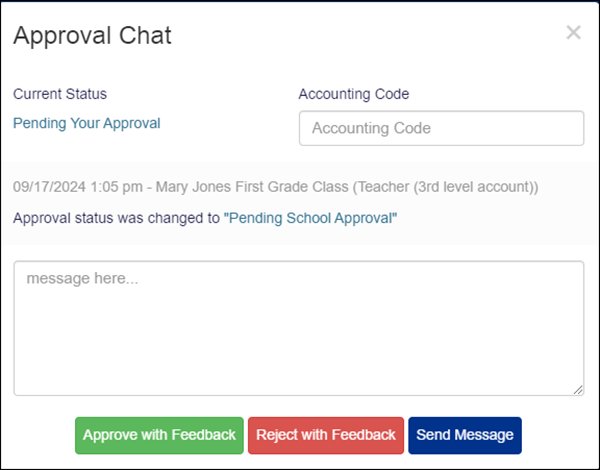
b. Add the accounting code, if it wasn’t entered by the bookkeeper. c. Enter a message in the text box (required). d. Do any of the following:
Your message is added to the Approval Chat with the appropriate status update. |
For additional help, contact techsupport@follettsoftware.com.